Ask ChatGPT about Apple's last quarter and you get a clean answer. Ask it about a Series B software company that raised nine months ago and you get a confident paragraph of fiction, or a polite refusal. That gap is the entire problem. ChatGPT's training data is thin on private company data by design, because most of it lives behind paywalls, in CRMs, or in filings that never made it to the open web.
The fix is not a better prompt. The fix is giving ChatGPT a route to real data at query time. As of 2026 there are four mechanisms that actually work, and each of them makes sense in a specific situation. This guide walks through all four, shows where each one breaks, and gives you a decision rule at the end.
What "private company data" actually means in a ChatGPT workflow
Two different things share this label, and confusing them is where most implementation projects die.
The first is your own proprietary company data: internal memos, CRM records, deal pipeline, portfolio dashboards. The second is market data about privately-held companies: funding rounds, cap tables, revenue estimates, headcount signals, ownership graphs, news events. Both are "private" in different senses, and both usually need to be in the same ChatGPT session for a useful answer. When a deal partner asks "does this target match our thesis," they need internal criteria and external market context stitched together.
The four mechanisms below cover both cases.
Method 1: Upload files directly (fastest, weakest)
The most direct path is dragging a PDF, CSV, or XLSX into a chat. ChatGPT parses it, holds it in context, and answers questions against it. For a one-off CIM review or a quick pass on a target's financials, this is fine.
The ceiling shows up fast. File uploads have no memory across sessions unless you save them into a Project or a Custom GPT's knowledge. Files don't refresh, so any question about "the latest" is wrong the moment the file was exported. And OpenAI's own documentation is clear that on ChatGPT Business, Enterprise, and Team plans, your data is not used to train models by default, but on a personal Plus account you have to turn off "Improve the model for everyone" yourself, which Forbes documented in detail in August 2025.
Use file upload when the data is static, the session is short, and nobody else needs to reproduce the workflow.
Method 2: Custom GPTs with Actions (schema-driven API calls)
A Custom GPT is a saved configuration of ChatGPT with its own instructions, knowledge files, and optionally, Actions. Actions are OpenAPI 3.0 schemas that let the GPT call any REST endpoint you point it at, with authentication handled inside the GPT's config.
This is the first real bridge from ChatGPT to a live private company data API. A deal-sourcing GPT can hit a funding database, a competitor blog, and a CRM in one turn, then synthesize. The setup is: build the GPT, paste your OpenAPI schema into the Actions panel, add an auth method, and test. OpenAI's own Custom GPT documentation walks through the flow.
Two limits matter. First, Custom GPTs live inside ChatGPT's UI, so they don't work in the API or in third-party clients. Second, they only run for the user who's chatting; there's no scheduled or agentic mode. Good for repeatable analyst workflows, wrong for anything that needs to run overnight.
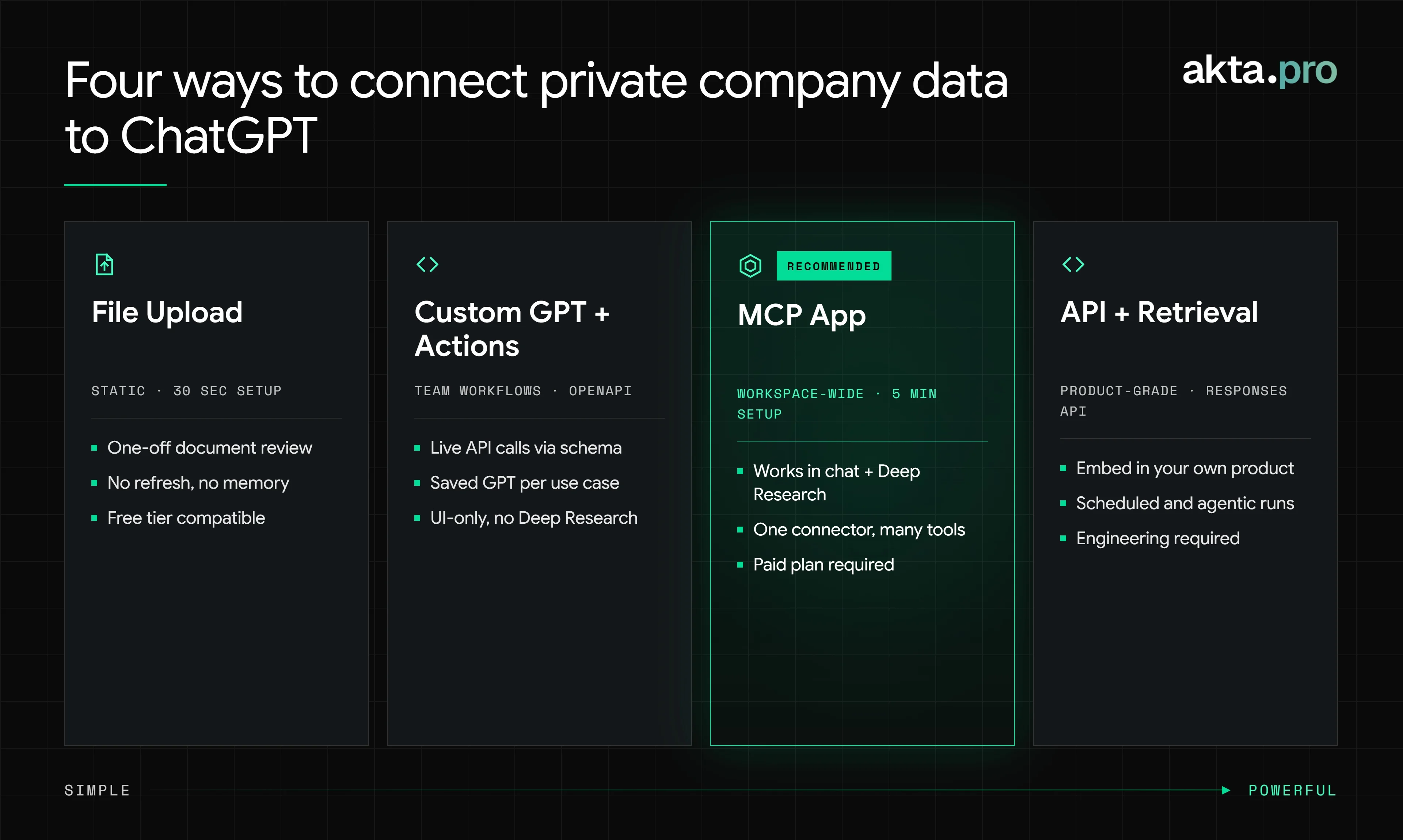
Method 3: MCP plugins (the 2026 default, with one setup gate)
The most significant shift in the last twelve months is that ChatGPT now speaks the Model Context Protocol natively. MCP was introduced by Anthropic in November 2024. OpenAI announced support across the Agents SDK, Responses API, and ChatGPT desktop app in March 2025, rolled out Developer Mode with full MCP support in October 2025, launched the App Directory and Apps SDK in December 2025, and on July 9, 2026 folded the App Directory into a unified Plugins directory. If a tutorial written before that date says "connectors" or "apps", it's describing the same underlying mechanism with older labels.
A ChatGPT plugin backed by MCP is a remote server that exposes a set of tools ChatGPT can call. For private company data, that means a single endpoint can give ChatGPT the ability to search companies, pull enrichment, fetch news, retrieve filings, and run buyer screens without you writing a line of glue code.
There are two paths to using one.
Published plugins from the directory. No configuration required beyond signing in. If a provider has submitted their MCP-backed plugin to the Plugins directory and it has cleared review, any paid user can turn it on from the Plugins menu. This is the frictionless path once a provider has shipped.
Custom MCP servers via Developer Mode. Any remote MCP endpoint can be added directly, but only through Developer Mode. As an example, akta.pro exposes its full private markets stack, company search, enrichment, news signals, buyer and target screening, through a single MCP endpoint at https://mcp.akta.pro/mcp. The setup on a personal Plus or Pro account:
-
Settings → Security and login → toggle on Developer mode
-
Go to Plugins → click the + button
-
Enter a name, paste the MCP server URL including the
/mcppath -
Complete OAuth (or select no-auth if the provider supports it)
-
Review the discovered tools and confirm
On Business, Enterprise, and Edu workspaces there is an extra step upfront: a workspace admin must enable Developer Mode in Workspace Settings → Permissions & Roles → Connected Data → Create custom MCP connectors before individual users see the toggle. This is a one-time governance action, not a per-user setup, but IT usually owns it.
Two things worth flagging honestly. First, OpenAI's own Developer Mode documentation describes it as "powerful but dangerous" and warns about prompt injection, destructive write actions, and malicious MCP servers. Only connect servers you trust, and for a private markets workflow, that means confirming the provider's data-handling posture in writing. Second, full MCP support with write actions is still in beta on Business, Enterprise, and Edu plans as of mid-2026, so behavior can shift; OpenAI carries a standing "functionality may change" note on the feature.
Once the plugin is live, the tools are available inside chat, Deep Research, and Company Knowledge. Deep Research is where the highest-value analyst queries run, and it's the reason most PE and VC teams standardized on the MCP path over the last year.
Method 4: The API with your own retrieval layer
For teams building products on top of ChatGPT rather than using ChatGPT as a UI, the answer is the Responses API with either the built-in web_search tool, remote MCP tools, or a custom retrieval layer.
This is how you get scheduled runs, batch processing, embedding on a portfolio dashboard, or a private-markets copilot inside your own product. OpenAI's MCP and Connectors guide shows how remote MCP servers plug into the Responses API with a few lines of code. The developer experience is close to identical to using MCP plugins in the ChatGPT UI, which is the point.
curl https://api.openai.com/v1/responses \
  -H "Authorization: Bearer $OPENAI_API_KEY" \
  -H "Content-Type: application/json" \
  -d '{
    "model": "gpt-5",
    "input": "Screen for UK precision manufacturing targets under £40M revenue",
    "tools": [{
      "type": "mcp",
      "server_url": "https://mcp.akta.pro/mcp",
      "server_label": "akta-pro"
    }]
  }'
The tradeoff is that you own the surrounding software. Auth, rate limiting, cost controls, logging, model routing. If you don't have engineering to spare, use Method 3.
Choosing without overthinking it
| Your situation | Use this method |
|---|---|
| One-off question, data fits in a file | File upload |
| 3–4 repeatable prompts against the same source | Custom GPT with Actions |
| Chat + Deep Research, ongoing analyst use | MCP-backed plugin |
| Embedding inside your own product | API with your own retrieval layer |
Ninety percent of investment and corporate-strategy teams should start with an MCP-backed plugin. The setup cost is trivial once Developer Mode is enabled, the surface area is broad, and you get Deep Research support for free, which is where the highest-value queries live.
The governance layer nobody talks about
Two things go wrong even after the plumbing works.
The first is data lineage. When ChatGPT synthesizes an answer from five tool calls, an analyst needs to see which numbers came from which source. Any private markets data workflow that ends in an IC memo has to preserve source attribution. Ask any MCP plugin you evaluate whether tool responses return permalinks and dates. If they don't, you're building a hallucination generator with better packaging.
The second is scope of access. ChatGPT Enterprise's admin controls let workspace admins whitelist which plugins employees can use, and Developer Mode is gated separately at the workspace level. The plugin itself controls what data it exposes. For a private company data API, that means checking whether your subscription tier gates specific tools, whether user-level auth is supported, and whether audit logs land somewhere your compliance team can read.
FAQ
Can ChatGPT access real-time private company data?
Only if you connect it to a source that has it. ChatGPT's base model knows very little about non-public companies and nothing about anything since its training cutoff. Connecting an MCP plugin, a Custom GPT Action, or a live API call is the only way to get real-time private company data into a response. akta.pro's MCP endpoint is built for exactly this: an AI agent can query it live instead of relying on stale training data.
What is an MCP plugin in ChatGPT?
A plugin backed by the Model Context Protocol is an external tool ChatGPT can call at query time. OpenAI adopted MCP (originally created by Anthropic in November 2024) across its stack in 2025, and as of the July 9, 2026 directory reorganization, MCP-backed integrations live inside the unified Plugins directory. Published plugins install with one click; custom MCP servers require Developer Mode.
Do I need a paid ChatGPT plan to connect private company data?
Yes. Custom GPT Actions and Developer Mode (required for custom MCP servers) are available on Plus, Pro, Business, Enterprise, and Education plans on web. Published plugins from the directory are available on those same paid tiers. File uploads work on free accounts but come with the tradeoffs described above.
Can ChatGPT pull data from an API?
Yes, through three routes: Custom GPT Actions using an OpenAPI schema, MCP-backed plugins connected at the user or workspace level, or the Responses API with remote MCP tools when you're building your own product. akta.pro exposes all three paths (a REST API, an MCP endpoint, and a Custom GPT-compatible OpenAPI schema), so an AI agent can reach it whichever way your team has already standardized on.