Ask an AI assistant for the latest funding round of a private company, and it will either guess or admit it cannot see that data. The model is not the problem. It simply has no connection to the systems where the answer lives.
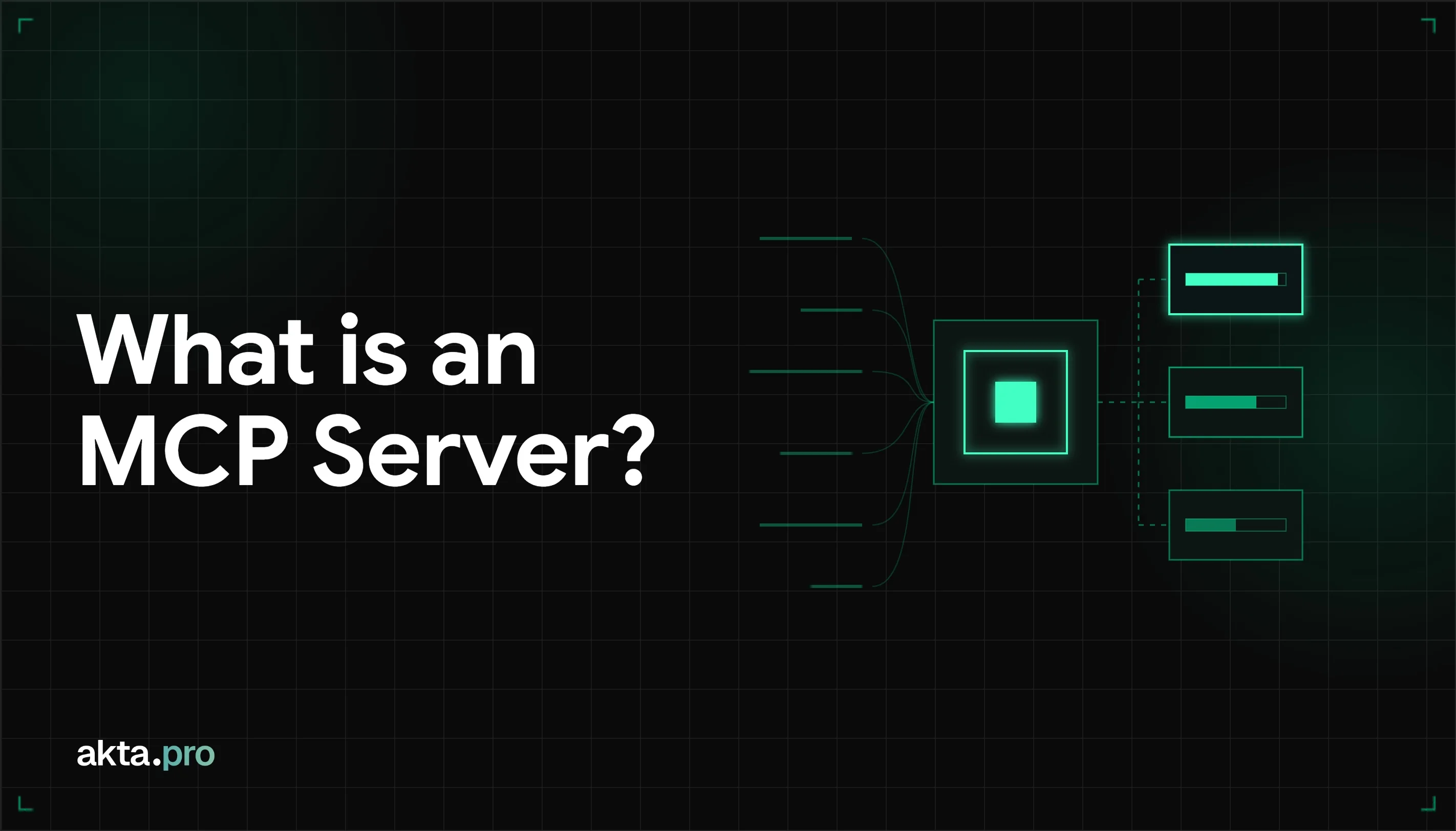
An MCP server is the missing connection. It is a program that exposes tools, data, and prompt templates to AI applications through the Model Context Protocol (MCP). It receives requests from an AI client, runs them against databases, APIs, or files, and returns structured results. One server works with any compatible client, including Claude, ChatGPT, Cursor, and VS Code.
The idea caught on fast. Since Anthropic released the protocol in November 2024, the ecosystem has grown to more than 10,000 active public servers and 97 million monthly SDK downloads. At Wokelo AI, we run one ourselves for akta.pro, our private company data API, so some of what follows comes from operating a server in production.
This guide covers how an MCP server works, what it can expose, eight business examples, and where company data fits in.
Key takeaways
- An MCP server is the provider side of the protocol. The AI app is the client side.
- It can expose tools (actions), resources (read-only context), and prompts (reusable templates).
- It is not an API and not function calling, but it works alongside both.
- Business teams get the most value from internal and data-heavy use cases, such as company intelligence.
Where MCP Servers Came From
Before MCP, every connection between an AI system and an external tool needed custom code. A team that wanted Claude to query a database, read files, and call an internal API had to build three separate integrations. Anthropic introduced MCP on November 25, 2024 to replace that patchwork with one standard. Engineers David Soria Parra and Justin Spahr-Summers built it.
In December 2025, Anthropic donated the protocol to the Linux Foundation's Agentic AI Foundation, so no single vendor controls it.
What Is an MCP Server?
An MCP server is a program that implements the Model Context Protocol (MCP) and exposes capabilities to AI clients. It accepts JSON-RPC 2.0 requests, executes them against a database, API, file system, or any other system, and returns the result in a structured format.
Anthropic released the protocol on November 25, 2024. Engineers David Soria Parra and Justin Spahr-Summers built it to fix a specific problem. Before MCP, every connection between an AI system and an external tool needed custom code. A team that wanted Claude to query a database, read files, and call an internal API had to build three separate integrations. MCP replaces those with one standard that any compatible client can use.
MCP vs. an MCP Server
MCP is the specification. It defines the message format (JSON-RPC 2.0), the connection lifecycle (initialization, capability negotiation, termination), and the kinds of capabilities that can be exchanged. A specification does not run anywhere.
An MCP server is a running program that follows that specification. The relationship mirrors HTTP and Nginx. HTTP defines the rules, and Nginx is software that implements them.
The Four Components of MCP Architecture
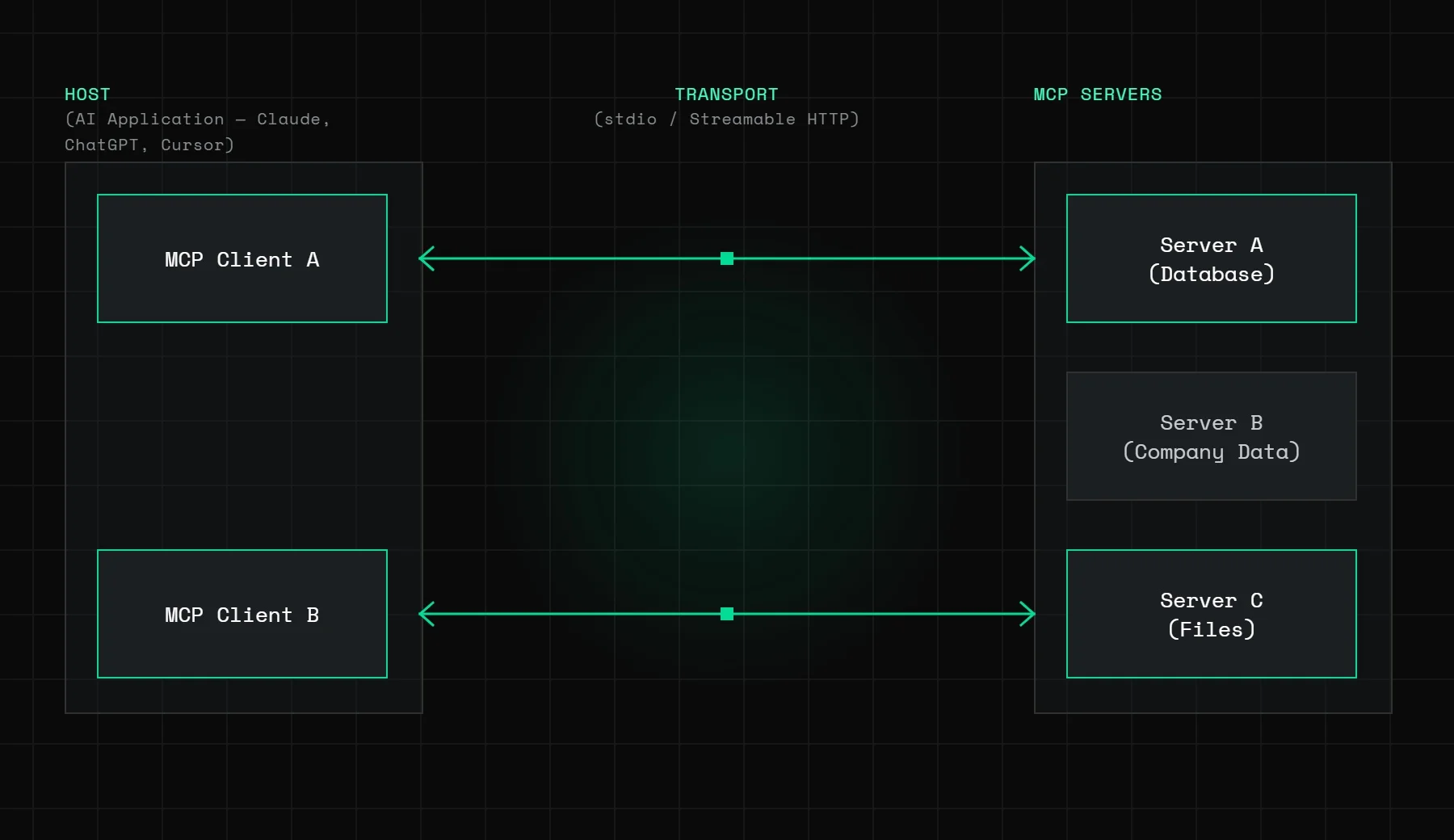
Host
The host is the AI application the user works in. Claude, ChatGPT, Cursor, VS Code, and Claude Code are all hosts. The host manages one or more MCP clients and coordinates the user, the language model, and the servers.
Client
The client lives inside the host and holds a dedicated one-to-one connection with a single server. It handles initialization, capability negotiation, requests, and responses. A host connected to three servers runs three clients.
Server
The server exposes the capabilities. It can run locally on the same machine as the host or remotely over HTTP. A local server might give access to your files. A remote server might expose a company data platform to any AI agent that connects.
Transport
Transport defines how clients and servers exchange messages. MCP supports two options:
- stdio: the client launches the server as a local subprocess and communicates through standard input and output. There is no networking and no configuration, which suits local tools.
- Streamable HTTP: the client sends JSON-RPC messages over HTTP. This enables remote servers and standard authentication such as OAuth and API keys. It replaced the older HTTP+SSE transport, which was deprecated in the 2025-03-26 spec revision and removed in 2025-06-18.
Messages are identical on both transports, so a server built locally over stdio can move to remote HTTP without changing its tool definitions. The official MCP architecture documentation covers the full lifecycle.
The Three Things an MCP Server Can Expose
An MCP server exposes tools, resources, prompts, or a mix. The split matters because each type carries a different level of risk.
Tools (model-controlled)
Tools are executable functions the model can call on its own. When an agent decides it needs to fetch company news or create a ticket, it calls a tool. The model chooses when to call and what arguments to send, so tools carry the most security risk. Scope them tightly and require human confirmation for anything that changes data.
Resources (application-controlled)
Resources are read-only data the application pulls into the conversation as context. File contents, database schemas, and documentation are typical examples. The model does not invoke them, so risk is lower, but a resource that exposes customer records still needs access control.
Prompts (user-controlled)
Prompts are reusable templates the user selects explicitly. A database server might offer a prompt with examples of well-formed queries. Nothing runs without the user choosing it, which makes prompts the safest type.
MCP Server vs. API vs. Function Calling
| MCP server | REST API | Function calling | |
|---|---|---|---|
| What it is | A running program that exposes capabilities through the MCP protocol | An HTTP interface for software to communicate | A vendor mechanism for a model to invoke a defined function |
| Who calls it | Any MCP-compatible AI client | Any HTTP client | One model, through its provider's SDK |
| Reuse across AI clients | One server works with Claude, ChatGPT, Cursor, and VS Code | Needs a custom integration per AI platform | Tied to a vendor SDK |
| Tool discovery | Dynamic: the client asks the server what it offers | Static: read the docs and configure by hand | Supplied as a schema at call time |
| Authentication | OAuth or API key per the MCP spec | Standard web auth | Inherited from the host app |
MCP does not replace your APIs. It adds a standard way for AI agents to discover and call them without custom code for each platform.
8 MCP Server Examples for Business Teams
| MCP server | Business function | What it exposes | Typical risk |
|---|---|---|---|
| akta.pro | Company and market intelligence | 20M+ private companies, news signals, entity resolution | Low to medium |
| GitHub | Engineering | Repositories, pull requests, issues, commits | High if write access is enabled |
| Slack | Team communication | Channels, messages, search | Medium |
| Salesforce | CRM and sales | Contacts, accounts, opportunities, activity | High if write access is enabled |
| Snowflake | Data analytics | Schemas, read-only queries, metadata | Medium |
| Datadog | IT operations | Infrastructure metrics, traces, logs | Medium |
| Figma | Design | Frames, component attributes, layout tokens | Low |
| Notion | Documentation | Wiki pages, project files, search | Medium |
Risk tiers here are indicative. Your real risk depends on the permissions you grant, so start every server read-only.
Three of these matter most for business and data teams:
- Snowflake: an agent can answer plain-language questions against your warehouse without anyone writing SQL. Connect it with read-only credentials.
- Salesforce: an agent can pull account history, open deals, and prior touchpoints before a meeting. Require human approval for any write.
- akta.pro: covered in the next two sections.
MCP Servers for Company and Market Intelligence
Most MCP guides stop at developer tools and generic SaaS connectors. Company intelligence is where business teams get some of the clearest value.
Jeremiah Lowin, CEO of Prefect and creator of FastMCP, told The Pragmatic Engineer that "the median MCP user is someone who says something like: 'I want to access my company's own data warehouse through an MCP server.'" The same report, based on input from 46 engineers, found that internal MCP usage far outpaces public usage. Lowin added that "almost every team that we talk to now is an internal team serving internal stakeholders, including non-engineers."
Company data fits that pattern. The information exists, but getting it used to require an analyst who knew the tools, the data model, and the filters. An MCP server removes that barrier. Four workflows show how:
- Deal sourcing. An analyst asks an agent for Series B fintech companies in Southeast Asia with fast headcount growth. The agent builds the list, enriches each company, and surfaces recent news.
- Portfolio monitoring. An agent scans news across a fund's portfolio each morning and flags leadership changes, funding events, and risk signals.
- Competitive intelligence. A GTM team asks for the last 30 days of news on ten competitors, grouped by event type. Entity resolution matters here, because it keeps news about similarly named companies from polluting the results.
- Prospect enrichment. A sales workflow enriches a target account list with firmographics, headcount trends, and recent signals in one agent session.
For the data side of these workflows, see how real-time company news signals fit into AI workflows.
The akta.pro MCP Server
akta.pro is a private company data and news signals API built by Wokelo AI. Its MCP server runs at https://mcp.akta.pro/mcp and works with Claude, ChatGPT, Cursor, VS Code, Claude Code, and other MCP clients. It exposes:
- Company resolution: find any company by name, website, or UUID using entity resolution across 20M+ private companies.
- Company enrichment: 70+ structured data points per company, including firmographics, business model, management, and technology stack.
- News signals: entity-resolved, classified news across 30K+ monitored sub-sectors, with about 80% of news noise filtered before delivery.
- List generation: targeted company lists by sector, geography, and other filters.
- Alternative signals: headcount trends, website traffic, job posts, and employee reviews on higher tiers.
The server uses Streamable HTTP. Web clients such as Claude and ChatGPT authenticate through the connector flow, and IDE and CLI clients use an API key. akta.pro is SOC 2 Type II certified, ISO 27001 compliant, encrypted end to end, and does not train models on customer data. Retrieval quality is covered in akta.pro's news retrieval benchmark.
Setup guides for specific clients: accessing private company data through Claude and giving ChatGPT access to private company data.
How to Connect an MCP Server
Setup differs by client. These are the most common.
Claude (web or desktop): open Settings, go to Connectors, choose Add Connectors, enter the server name and URL, and complete authentication.
ChatGPT: enable Developer Mode in Settings, open Plugins, add a new plugin, paste the server URL, and choose OAuth.
Cursor (~/.cursor/mcp.json):
{
  "mcpServers": {
    "akta-pro": {
      "url": "https://mcp.akta.pro/mcp",
      "headers": { "x-api-key": "YOUR_AKTA_API_KEY" }
    }
  }
}
VS Code (.vscode/mcp.json):
{
  "inputs": [
    {
      "type": "promptString",
      "id": "akta-api-key",
      "description": "akta.pro API key",
      "password": true
    }
  ],
  "servers": {
    "akta-pro": {
      "type": "http",
      "url": "https://mcp.akta.pro/mcp",
      "headers": { "x-api-key": "${input:akta-api-key}" }
    }
  }
}
Claude Code:
claude mcp add --transport http akta-pro https://mcp.akta.pro/mcp \
  --header "x-api-key: <YOUR_API_KEY>"
On connection, the client calls tools/list to discover what the server offers. The model can then use every exposed tool with no further setup.
MCP Server Security: What to Check Before Going Live
MCP began as a local tool protocol, where client and server shared one machine and one trust boundary. A remote MCP server removes that boundary. It is an API that accepts requests over the network, so it faces every normal API risk plus one specific to AI agents: prompt injection.
In prompt injection, an attacker hides instructions in data the model reads, such as a support ticket or a web page, and tricks the model into calling tools with unintended arguments. Defenses include scanning inputs, sanitizing retrieved content, and enforcing strict parameter limits on the server.
Every production deployment should also have:
- Authentication: OAuth for web clients and scoped API keys for IDE and CLI clients.
- Authorization: different tools for different roles. Read-only analysts should not see write tools.
- Rate limiting: agents can fire hundreds of tool calls a minute and exhaust quotas fast.
- Audit logging: record the caller, arguments, and result for every tool call.
- Human approval: require confirmation for any action that changes records, moves money, or sends messages.
The Anthropic announcement of the Agentic AI Foundation quotes Mike Krieger, Anthropic's Chief Product Officer, saying the donation "ensures it stays open, neutral, and community-driven as it becomes critical infrastructure for AI." Neutral governance does not make any individual server safe, so vet every server you connect.
When Not to Use an MCP Server
MCP suits interactive and agentic work. It is a poor fit for some jobs:
- Batch jobs and scheduled pipelines. Enriching 50,000 companies overnight or running a nightly portfolio news pull belongs on the REST API. Nobody is in the loop, so MCP adds overhead for no gain. The company alerts API guide covers the pattern.
- Searching a large document corpus. Use an indexed retrieval system with embeddings. MCP tool calls fetch records one at a time.
- Fixed, high volume logic. If the steps never change, a direct API call or workflow engine is faster, cheaper, and more predictable than routing through a language model.
- Too many servers at once. Each connected server adds tool definitions to the model's context. Start with three to five focused servers and add more only for a specific workflow.
FAQ
What does MCP stand for?
MCP stands for Model Context Protocol. It is an open standard that Anthropic introduced in November 2024 to standardize how AI applications connect to external data and tools. In December 2025, Anthropic donated it to the Linux Foundation's Agentic AI Foundation, which makes it a vendor-neutral standard.
What is the difference between an MCP server and an MCP client?
An MCP server exposes tools, resources, and prompts. An MCP client sits inside the AI host application and keeps a dedicated connection to one server, sending requests on the model's behalf. A host connected to three servers runs three clients.
What are the three things an MCP server can expose?
An MCP server can expose tools (functions the model calls), resources (read-only context data), and prompts (reusable templates the user selects). Tools carry the most risk because the model invokes them on its own.
How do I connect an MCP server to Claude or ChatGPT?
In Claude, open Settings, choose Connectors, add the server name and URL, and complete authentication. In ChatGPT, enable Developer Mode, add the server under Plugins, and authenticate with OAuth. IDE and CLI clients such as Cursor, VS Code, and Claude Code use a JSON config file with an API key.
Is an MCP server the same as an API?
No. An API is an interface for software to talk to other software. An MCP server wraps an API or any other system and exposes it to AI agents through a standard protocol, including runtime tool discovery. Your underlying API stays the same, and one MCP server serves every compatible AI client.
Next Step
If your team wants to try MCP on company data, connect the akta.pro news signals API and the private company data API through https://mcp.akta.pro/mcp. Point Claude or Cursor at it, and you can query private companies in plain language within minutes.